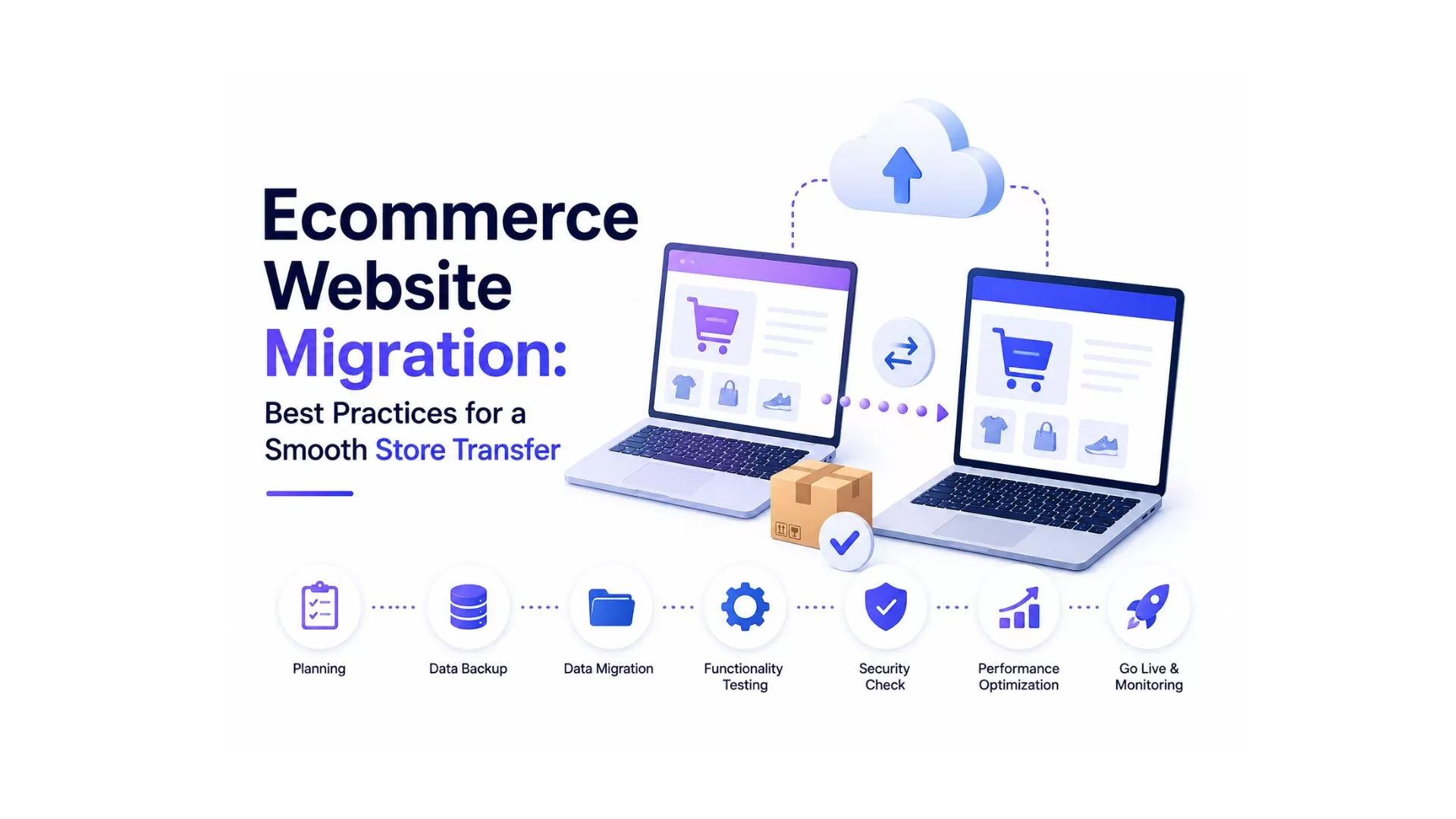
Ecommerce website migration is the process of moving an online store from one platform, server, hosting provider, or domain to another while preserving products, customer information, order history, SEO performance, and business operations. A successful migration requires careful planning, complete data backups, SEO preservation, URL redirection, integration testing, and post-launch monitoring to minimize downtime and maintain customer trust. Whether you're migrating from WooCommerce to Shopify, Magento to Adobe Commerce, or upgrading to a custom ecommerce solution, following a structured migration strategy helps reduce risks and ensures a smoother transition.
Key Takeaways
- Ecommerce migration involves much more than transferring products-it includes customer data, SEO, integrations, design, and performance.
- Careful planning before migration reduces downtime and prevents data loss.
- Protecting SEO with 301 redirects, metadata preservation, and XML sitemap updates helps maintain search rankings.
- Every payment gateway, shipping method, and third-party integration should be tested before launch.
- Businesses should monitor Google Search Console, analytics, and website performance closely after migration.
- A phased migration strategy is generally safer than making multiple major changes simultaneously.
- Modern ecommerce migrations increasingly include cloud infrastructure, automation, and AI-powered optimization.
For many businesses, an ecommerce website is much more than an online storefront. It manages product catalogs, customer accounts, payments, inventory, marketing campaigns, and day-to-day operations. As businesses grow, the platform that once met their needs may no longer provide the flexibility, scalability, or performance required to support future expansion.
This is where ecommerce website migration becomes an important business decision.
Migration is often viewed as a technical project, but in reality, it affects almost every aspect of an ecommerce business. A successful migration requires collaboration between business owners, developers, designers, SEO specialists, marketers, customer support teams, and infrastructure engineers.
Organizations migrate ecommerce websites for many reasons. Some need better performance to handle increasing traffic. Others want to move from a legacy platform to a cloud-based solution, improve security, simplify store management, or introduce new capabilities such as AI-powered search, omnichannel selling, and advanced automation.
However, migration also introduces risks.
Without proper planning, businesses may experience:
Temporary or permanent SEO ranking losses
- Broken links
- Missing products
- Lost customer accounts
- Payment failures
- Inventory mismatches
- Downtime
- Poor customer experience
Fortunately, most migration challenges can be avoided through structured planning and proven best practices.
This guide explains every stage of ecommerce website migration-from planning and platform selection to SEO protection, testing, launch, and post-migration monitoring. Whether you're moving to Shopify, WooCommerce, Adobe Commerce, BigCommerce, or a custom ecommerce platform, these best practices can help you complete a smooth and successful store transfer.
What Is Ecommerce Website Migration?
Ecommerce website migration is the process of transferring an online store from one technology environment to another while maintaining business continuity and protecting critical digital assets.
Depending on business requirements, migration may involve:
- Moving from one ecommerce platform to another
- Changing web hosting providers
- Migrating to a new domain
- Redesigning the online store
- Upgrading infrastructure
- Modernizing legacy systems
- Implementing cloud-native architecture
Unlike a standard website migration, ecommerce migration includes complex business data that must remain accurate throughout the process.
This includes:
- Products
- Categories
- Product images
- Customer accounts
- Passwords (where supported)
- Order history
- Coupons
- Inventory
- Shipping settings
- Tax rules
- Payment gateway configurations
- Reviews
- SEO metadata
- URL structure
Every component contributes to the overall customer experience and business operations.
A successful migration should be almost invisible to customers. They should still be able to browse products, place orders, make payments, and access their accounts without interruption.
What Does an Ecommerce Migration Include?
A complete ecommerce migration typically includes several interconnected activities rather than a single data transfer.
Product Migration
This involves transferring:
- Product titles
- Descriptions
- Images
- Categories
- Collections
- Variants
- SKU information
- Inventory levels
- Pricing
Incomplete product migration can lead to missing information, incorrect pricing, or inventory discrepancies.
Customer Migration
Customer data is one of the most valuable business assets.
Migration generally includes:
- Customer profiles
- Billing addresses
- Shipping addresses
- Purchase history
- Loyalty information
- Customer groups
Maintaining customer records helps ensure continuity and improves customer trust after migration.
Order History Migration
Historical orders support accounting, reporting, customer service, and future business analysis.
Businesses should verify that:
- Order numbers remain accurate
- Payment records are complete
- Shipping history is preserved
- Refund information is available
- Order statuses are correctly mapped
SEO Migration
One of the most critical aspects of ecommerce migration is protecting existing search engine rankings.
SEO migration typically includes:
- URL mapping
- 301 redirects
- Meta titles
- Meta descriptions
- Canonical tags
- Structured data
- XML sitemap updates
- Robots.txt validation
- Internal link updates
Ignoring SEO during migration can significantly reduce organic traffic.
Third-Party Integration Migration
Modern ecommerce businesses rely on multiple external services.
Examples include:
- Stripe
- PayPal
- Google Analytics 4
- Google Merchant Center
- Meta Pixel
- Klaviyo
- Mailchimp
- ERP software
- CRM systems
- Inventory management tools
- Shipping providers
Each integration should be reconfigured and tested before launch.
Key Takeaway
A successful ecommerce migration is much more than copying data from one platform to another. It involves transferring business operations, preserving customer experiences, protecting SEO performance, and ensuring that every connected system continues to function correctly after launch.
Why Do Businesses Migrate Ecommerce Websites?
Businesses migrate ecommerce websites to improve scalability, performance, operational efficiency, customer experience, and long-term growth. As technology evolves and customer expectations increase, many organizations discover that their existing ecommerce platform no longer aligns with their business objectives.
Understanding the reasons behind migration helps organizations define clear project goals and select the most appropriate migration strategy.
Better Scalability
As online stores grow, they often require additional resources to support increasing traffic, expanding product catalogs, multiple sales channels, and international customers.
Older platforms may struggle to handle these requirements efficiently.
Migrating to a scalable ecommerce platform enables businesses to:
- Support larger product catalogs
- Handle seasonal traffic spikes
- Expand into new markets
- Add additional storefronts
- Improve operational flexibility
Choosing a platform that supports long-term growth reduces the need for frequent technology changes.
Improved Website Performance
Website speed directly influences user experience, conversion rates, and search engine rankings.
Migration provides an opportunity to optimize:
- Server infrastructure
- Database performance
- Image delivery
- Code quality
- Content delivery networks (CDNs)
- Caching strategies
Faster websites generally improve customer satisfaction while supporting stronger SEO performance.
Enhanced Security
Cybersecurity remains a major concern for ecommerce businesses.
Migrating from outdated platforms allows organizations to benefit from:
- Modern encryption standards
- Secure payment processing
- Multi-factor authentication
- Regular software updates
- Improved compliance
- Better access control
Strong security protects both customer data and business reputation.
Better Customer Experience
Customer expectations continue to evolve.
Businesses often migrate to improve:
- Mobile shopping
- Product discovery
- Navigation
- Checkout experience
- Personalized recommendations
- Account management
An improved customer experience contributes to increased engagement, repeat purchases, and higher conversion rates.
Access to Modern Ecommerce Features
Newer ecommerce platforms frequently introduce capabilities that are difficult or expensive to implement on older systems.
Examples include:
- AI-powered product recommendations
- Headless commerce architecture
- Omnichannel selling
- Advanced analytics
- Marketing automation
- Multi-currency support
- Multi-language storefronts
- API-first integrations
These features help businesses remain competitive in an increasingly digital marketplace.
Lower Maintenance Costs
Maintaining legacy ecommerce systems often requires ongoing development, manual updates, and expensive infrastructure.
Migrating to a modern platform may reduce:
- Hosting expenses
- Development effort
- Security maintenance
- Plugin management
- Infrastructure complexity
This allows businesses to allocate more resources toward innovation and growth.
Expert Recommendation
Before beginning any migration project, define measurable business objectives rather than focusing only on technical changes. Clear goals-such as improving website speed, reducing maintenance costs, expanding internationally, or enhancing customer experience-help guide migration decisions and make it easier to evaluate project success after launch.
Types of Ecommerce Website Migration
Not every ecommerce migration project follows the same approach. The migration strategy depends on business goals, current infrastructure, technical requirements, and future growth plans.
Understanding the different migration types helps businesses choose the right approach while reducing implementation risks.
Platform Migration
Platform migration involves moving an online store from one ecommerce platform to another.
Common examples include:
- WooCommerce to Shopify
- Magento to Shopify
- Shopify to WooCommerce
- OpenCart to Shopify
- PrestaShop to WooCommerce
- Adobe Commerce to Shopify
Platform migration generally includes:
- Products
- Categories
- Customers
- Orders
- Coupons
- Reviews
- Blog content
- SEO settings
- Images
Businesses usually choose platform migration to simplify store management, improve performance, or access modern ecommerce capabilities.
Server Migration
Server migration involves moving an ecommerce website to a different hosting provider or cloud infrastructure without changing the ecommerce platform.
Common reasons include:
- Better performance
- Improved uptime
- Stronger security
- Lower hosting costs
- Global CDN support
- Better scalability
Although server migration appears straightforward, incorrect DNS configuration or server setup can still cause temporary downtime.
Domain Migration
Domain migration occurs when an ecommerce business changes its website address.
Examples include:
- Brand rebranding
- Country-specific domains
- Domain consolidation
- Business acquisition
A domain migration requires careful planning to preserve SEO.
Critical tasks include:
- 301 redirects
- Canonical updates
- XML sitemap submission
- Google Search Console verification
- Internal link updates
Design Migration
Some businesses redesign their website while keeping the same ecommerce platform.
This may involve:
- New homepage
- Better navigation
- Improved product pages
- Mobile-first layouts
- Faster checkout
- Accessibility improvements
While design migration doesn't always involve data transfer, extensive testing is still required to ensure usability and functionality.
Database Migration
Database migration focuses on transferring structured business data.
Typical data includes:
- Products
- Categories
- Customers
- Orders
- Reviews
- Coupons
- Inventory
- Business settings
Data integrity should always be validated before launching the new website.
Complete Ecommerce Replatforming
Complete replatforming combines multiple migration activities into one project.
This often includes:
- New ecommerce platform
- New design
- New infrastructure
- New integrations
- Improved SEO
- Performance optimization
Although more complex, replatforming provides an opportunity to modernize the entire ecommerce ecosystem.
Key Takeaway
Selecting the right migration type depends on business objectives rather than technology alone. Businesses should evaluate scalability, operational requirements, customer experience, and long-term growth before deciding on a migration strategy.
Ecommerce Website Migration Checklist
A structured migration checklist helps businesses minimize risks and maintain operational continuity throughout the migration process.
Before Migration
Preparation is the foundation of a successful migration.
Create a Complete Backup
Back up:
- Website files
- Database
- Products
- Images
- Customer accounts
- Orders
- Theme files
- Plugin settings
Audit Your Existing Store
Review:
- Product catalog
- Categories
- Customers
- Orders
- Blog articles
- Landing pages
- Internal links
- Redirects
- SEO metadata
- Third-party integrations
Define Migration Goals
Examples:
- Improve website speed
- Reduce maintenance
- Better scalability
- Better SEO
- Modern design
- AI capabilities
Inventory Third-Party Integrations
Document every connected service.
Examples include:
- Stripe
- PayPal
- Google Analytics 4
- Google Merchant Center
- Meta Pixel
- Mailchimp
- Klaviyo
- ERP software
- CRM platforms
During Migration
Migrate Products
Verify:
- Titles
- Images
- Categories
- Variants
- Inventory
- Pricing
Transfer Customer Accounts
Ensure:
- Customer information
- Addresses
- Purchase history
- Customer groups
are transferred correctly.
Verify Order History
Review:
- Order numbers
- Status
- Payment records
- Refund history
- Shipping details
Configure Payment Gateways
Test:
- Stripe
- PayPal
- Apple Pay
- Google Pay
- Bank transfers
Every payment method should complete successfully.
Test Transactional Emails
Ensure customers receive:
- Order confirmations
- Shipping updates
- Password resets
- Account registration emails
After Migration
Verify Redirects
Test every important page.
Priority pages include:
- Homepage
- Categories
- Products
- Blogs
- Landing pages
Submit XML Sitemap
Submit the updated sitemap to:
- Google Search Console
- Bing Webmaster Tools
Validate Structured Data
Review:
- Product Schema
- Breadcrumb Schema
- FAQ Schema
- Organization Schema
Monitor Website Performance
Track:
- Core Web Vitals
- Crawl errors
- Page speed
- Mobile usability
- Index coverage
Expert Recommendation
Create a staging environment before launch and complete at least one full migration rehearsal. Identifying issues in a staging environment is far less disruptive than fixing them on a live ecommerce store.
Best Practices for a Smooth Store Transfer
Following established migration best practices significantly reduces project risks and improves long-term business outcomes.
Preserve Existing URLs
Maintaining existing URLs helps preserve search engine rankings and reduces broken links.
If URL changes are necessary, implement permanent 301 redirects.
Protect SEO Assets
Preserve:
- Meta titles
- Meta descriptions
- Canonical tags
- Header structure
- Image alt text
- Structured data
- Internal links
Test the Entire Customer Journey
Before launch, test:
- Homepage
- Navigation
- Search
- Product pages
- Cart
- Checkout
- Payments
- Shipping
- Order confirmation
Every customer interaction should function correctly.
Optimize Website Performance
Migration provides an opportunity to improve:
- Image optimization
- Lazy loading
- Browser caching
- CDN implementation
- Database optimization
- Core Web Vitals
Launch During Low-Traffic Hours
Schedule migration during periods with lower visitor activity to reduce customer disruption.
Monitor Continuously After Launch
Track:
- Organic traffic
- Keyword rankings
- Checkout success rate
- Error logs
- Conversion rate
- Customer feedback
The first few weeks after migration are critical.
Key Takeaway
Successful migrations don't end at launch. Continuous monitoring and optimization ensure that performance, SEO, and customer experience remain strong after the transition.
Common Ecommerce Migration Mistakes
Avoid these common issues:
- Skipping website backups
- Forgetting 301 redirects
- Losing metadata
- Ignoring internal links
- Not testing checkout
- Missing payment gateway validation
- Overlooking third-party integrations
- Changing platform, design, and domain simultaneously
- Launching without quality assurance
- Ignoring post-launch monitoring
SEO Checklist After Migration
After launch, verify that your ecommerce website remains technically healthy.
Use this checklist:
- Verify all 301 redirects
- Submit XML sitemap
- Update robots.txt if required
- Validate structured data
- Review canonical tags
- Monitor Google Search Console
- Check Google Analytics 4 tracking
- Review Core Web Vitals
- Fix broken links
- Update internal links
- Test mobile usability
Future Trends in Ecommerce Website Migration
Migration projects continue to evolve alongside ecommerce technology.
Key trends include:
- AI-assisted migration
- Headless commerce
- Composable commerce
- Cloud-native infrastructure
- API-first architecture
- Automated testing
- AI-powered quality assurance
- Intelligent product data mapping
- Personalized shopping experiences
- Predictive analytics
Businesses planning future migrations should evaluate not only current needs but also technologies that support long-term scalability and innovation.
Conclusion
Ecommerce website migration is a strategic investment that extends beyond technology upgrades. A well-planned migration helps businesses improve performance, enhance security, streamline operations, and create better customer experiences while protecting valuable SEO assets.
Whether you're migrating to Shopify, WooCommerce, Adobe Commerce, BigCommerce, or a custom ecommerce platform, success depends on careful preparation, structured execution, and ongoing optimization after launch.
By following the best practices, checklists, and recommendations outlined in this guide, businesses can reduce migration risks, maintain search visibility, and build a stronger foundation for long-term ecommerce growth.